

• How to Use FLiNG Trainers & Cheat Tables

    Compatibility: All trainers and cheat tables here target single-player and offline modes of PC games on the exact build noted in each thread. They do not bypass Easy Anti-Cheat, BattlEye, FairFight, or VAC — do not run them in multiplayer or ranked lobbies.

    Installation (4 steps):

    1. Download the trainer or .CT cheat table archive from the thread's attachments.
    2. For trainers: extract and run the .exe as Administrator. For cheat tables: install the latest Cheat Engine, then open the .CT file with it.
    3. Launch the target game first and reach the main menu. Attach trainer or cheat engine to the game process (CE: File → Open Process → pick the game).
    4. Use the listed function keys (trainers) or option toggles (CT) to enable cheats — infinite HP, ammo, money, one-hit kill, super speed, etc.

    If a cheat doesn't activate

    Confirm the game build matches the version listed at the top of this thread. Update Visual C++ Redistributables 2015–2022 (x64) and check that your antivirus hasn't quarantined the file. AV heuristics frequently false-positive on memory-editing tools — this is expected, not a real infection. Installation issues are discussed in Trainer Support.

    FLiNG Cheat hosts community-verified PC game trainers and cheat tables. All tools are free, offline-only, and targeted at single-player experiences.

Working Battle Realms: Zen Edition Trainer Fling

Working

This means the trainer/cheats is actively running.

Maintenance

This means the trainer/cheats are actively in maintenance mode.

Not Working

This means the trainer/cheats are not working.

Fling Cheat

Admin
Admin
Joined
Oct 28, 2023
Messages
7,858
Reaction score
26
Points
38
Battle Realms: Zen Edition Trainer Fling more than +21 options. Thanks to this trainer fling, you can customize your game.

Developer: Ed Del Castillo
Publisher: Ed Del Castillo
Trainer Coder: Exonet
Game About: Return of the Classic, now remastered! Battle Realms is a fantasy RTS inspired by the stories told in martial- arts movies and oriental mythology. Develop your peasants into a highly trained and deadly efficient clan of warriors who are ready to die with your name on their lips. It is being brought to you by an anonymous volunteer team. The team does not have an official page, but you can simply convey any issues you encounter as comments on flingmod.net. Additionally, you can browse through our <a href="https://flingtrainer.us/category/trainers/" title="fling mod, game trainer">Fling Trainer</a> category or use our site's search feature to explore other game trainers.
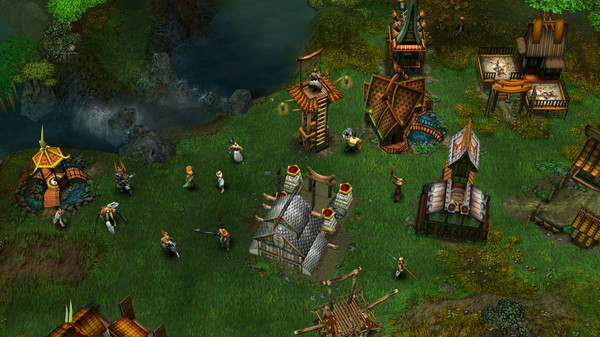


ss_c7a7c3aad17011ccc1517bdf3e865fa52fe76af5.600x338.jpg
flingtheme.png


How to install Battle Realms: Zen Edition Trainer​

The Trainer offers a set of 6+ functions and is compatible with all iterations of the game. To initiate the program, extract the contents of the archive, launch the Trainer, click on the game icon, and subsequently launch the game. The options menu can be accessed by pressing the F4 key.

Key Bindings

Numpad 0
Numpad 1
Numpad 2
Numpad 3
Numpad 4
Numpad 5

NOTES
The default value is 7, with the maximum value being 21. To revert to the original effect, please restore the value to its default setting.

File Size: 89 MB.
 

About Battle Realms: Zen Edition

Return of the Classic, now remastered! Battle Realms is a fantasy RTS inspired by the stories told in martial- arts movies and oriental mythology. Develop your peasants into a highly trained and deadly efficient clan of warriors who are ready to die with your name on their lips.

Genre: Action, Strategy  ·  Developer: Ed Del Castillo  ·  Released: 2025  ·  Players: Single-player, Multi-player, PvP  ·  Metacritic: 82/100

Battle Realms: Zen Edition Trainer — FAQ

Is the Battle Realms: Zen Edition trainer free to download?

Yes — the Battle Realms: Zen Edition trainer on FLiNG Cheat is a completely free download. There is no payment, subscription or survey required.

Is the Battle Realms: Zen Edition trainer safe to use?

The Battle Realms: Zen Edition trainer is shared and verified by the FLiNG Cheat community. Use it in single-player, disable it before going online, and follow the install steps in the thread above.

How do I install the Battle Realms: Zen Edition trainer?

Download the trainer from the thread above, extract the archive, run the trainer, then launch Battle Realms: Zen Edition. Toggle each option with its listed hotkey while the game is running.

Does the Battle Realms: Zen Edition trainer work with the latest version?

The community keeps trainers updated for new game patches. Check the thread above for the newest compatible Battle Realms: Zen Edition trainer build and update notes before downloading.

Download

If the trainer does not work, download all 2 files and then install them.

File Date added File size Downloads
exe Full.Access.Battle Realms: Zen Edition Trainer Fling-FLiNG
Standalone Versions:
zip Early.Access.Plus.Battle Realms: Zen Edition Trainer Fling

Similar topics

Back
Top